SMS & Calling Consent
WITNESS is a personal-safety app operated by Lara Steinauer, an individual and sole proprietor, under the trade name Quiet Part Loud. Quiet Part Loud is a trade name, not a separate legal entity. This page explains the optional text-message and automated-call alerts that WITNESS is preparing to offer, and exactly how a person agrees to them.
Not yet publicly available
Text and call alerts are not yet publicly available. WITNESS is not sending them to the public today. Nothing on this page promises that any alert will be sent or delivered.
What the alerts are
If a person in your WITNESS Safety Circle, or a person who named you as their Emergency Contact, sends an Emergency or an urgent safety alert, WITNESS can text you and call you so you know to open the app. These are safety alerts only. We do not send marketing texts or calls.
These alerts are Safety Circle notifications. They are not Professional Monitoring, which is a separate layer of WITNESS described in the Terms of Service. WITNESS does not replace 911 and does not guarantee delivery, intervention or emergency response.
How you agree
- You agree only inside the WITNESS app, and only after you have verified your own phone number. Nobody else can sign you up, and a person who adds you to their Safety Circle or names you an Emergency Contact cannot give consent for you.
- Text messages and phone calls are separate choices. Agreeing to one does not turn on the other.
- Agreeing is optional and is not required to use WITNESS.
- We record when you agreed or withdrew, which consent wording you were shown, and which phone number it applied to, kept as a scrambled (hashed) form and its last four digits.
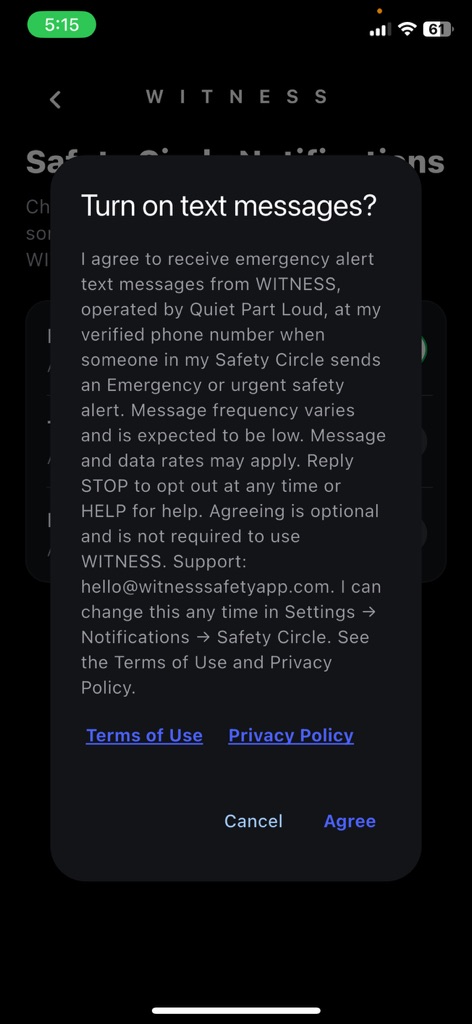
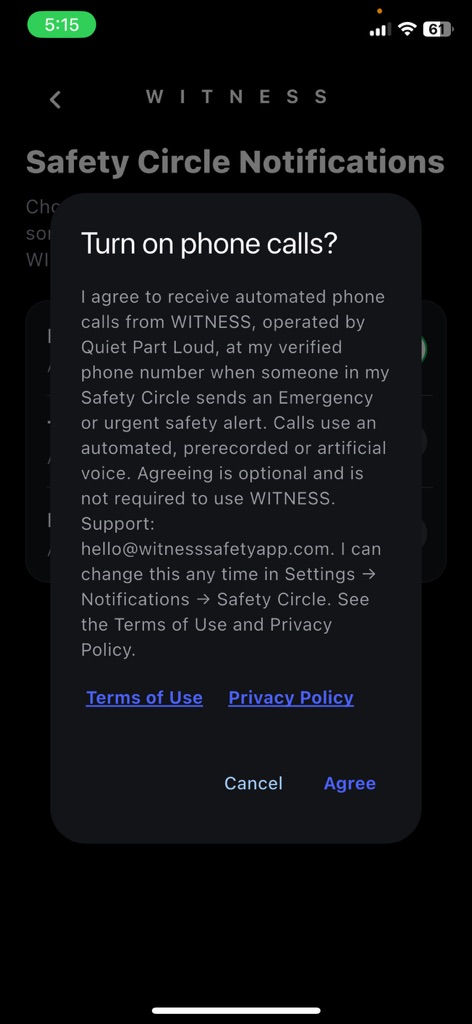
As a Safety Circle member. In the app, go to Settings, then Notifications, then Safety Circle. You will see separate rows for Text Messages and Phone Calls. Turning a row on opens a confirmation, "Turn on text messages?" or "Turn on phone calls?", that shows the consent statement below with links to the Terms and Privacy Policy. Nothing is turned on or recorded unless you tap Agree. Cancel leaves it off.
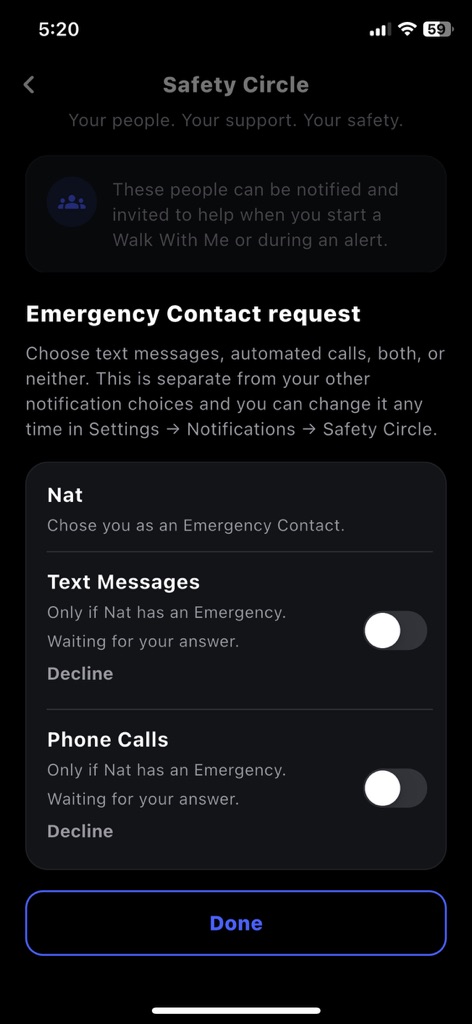
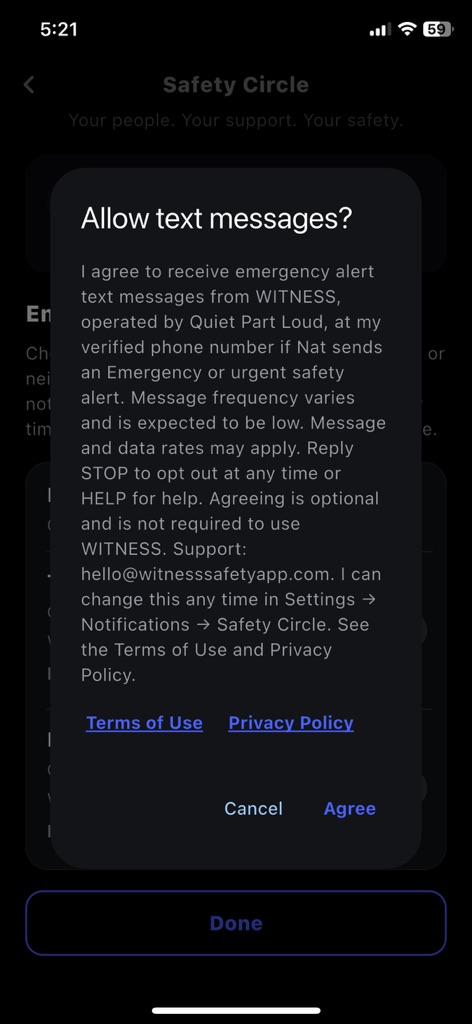
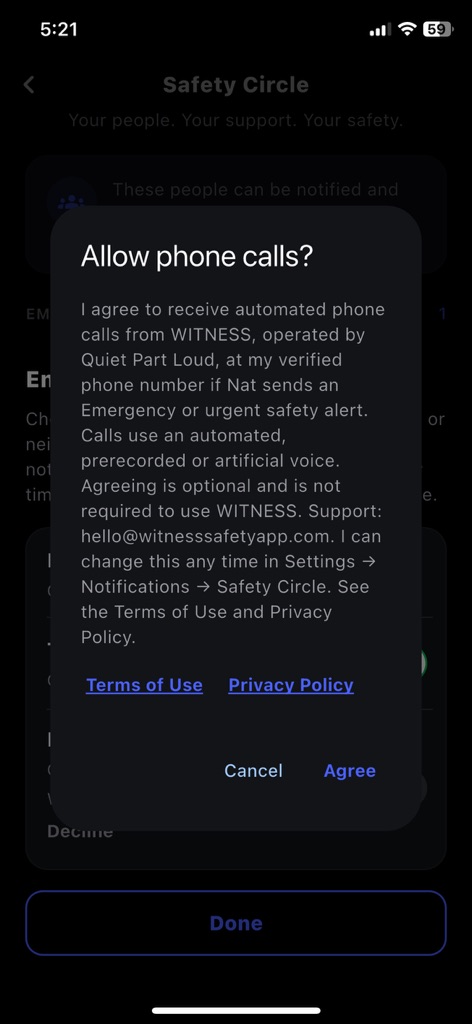
As an Emergency Contact. When someone designates you as their Emergency Contact, the app shows you an Emergency Contact request that names that person. You choose text messages, automated calls, both, or neither. Turning on a channel opens a confirmation, "Allow text messages?" or "Allow phone calls?", that names the person and shows the consent statement. Nothing is recorded unless you tap Agree. This request is separate from your other notification choices, and you can change it at any time.
The consent statements shown in the app
Safety Circle member, text messages
"I agree to receive emergency alert text messages from WITNESS, operated by Quiet Part Loud, at my verified phone number when someone in my Safety Circle sends an Emergency or urgent safety alert. Message frequency varies and is expected to be low. Message and data rates may apply. Reply STOP to opt out at any time or HELP for help. Agreeing is optional and is not required to use WITNESS. Support: hello@witnesssafetyapp.com. I can change this any time in Settings → Notifications → Safety Circle. See the Terms of Use and Privacy Policy."
Safety Circle member, phone calls
"I agree to receive automated phone calls from WITNESS, operated by Quiet Part Loud, at my verified phone number when someone in my Safety Circle sends an Emergency or urgent safety alert. Calls use an automated, prerecorded or artificial voice. Agreeing is optional and is not required to use WITNESS. Support: hello@witnesssafetyapp.com. I can change this any time in Settings → Notifications → Safety Circle. See the Terms of Use and Privacy Policy."
Emergency Contact, text messages (the person's name is filled in)
"I agree to receive emergency alert text messages from WITNESS, operated by Quiet Part Loud, at my verified phone number if [name] sends an Emergency or urgent safety alert. Message frequency varies and is expected to be low. Message and data rates may apply. Reply STOP to opt out at any time or HELP for help. Agreeing is optional and is not required to use WITNESS. Support: hello@witnesssafetyapp.com. I can change this any time in Settings → Notifications → Safety Circle. See the Terms of Use and Privacy Policy."
Emergency Contact, phone calls (the person's name is filled in)
"I agree to receive automated phone calls from WITNESS, operated by Quiet Part Loud, at my verified phone number if [name] sends an Emergency or urgent safety alert. Calls use an automated, prerecorded or artificial voice. Agreeing is optional and is not required to use WITNESS. Support: hello@witnesssafetyapp.com. I can change this any time in Settings → Notifications → Safety Circle. See the Terms of Use and Privacy Policy."
Messages you may receive
These are the planned messages. They do not include PINs, passwords or account details. If a sender's name is not available, the message says "Someone in your Safety Circle" instead of a name.
- Emergency alert: "WITNESS EMERGENCY ALERT: [name] requested emergency help. Open WITNESS to view and respond. Reply STOP to opt out."
- Emergency alert, other wording: "WITNESS EMERGENCY ALERT: [name] needs emergency assistance. Open WITNESS to view and respond. Reply STOP to opt out."
- Urgent safety alert: "WITNESS URGENT SAFETY ALERT: [name] needs urgent help. Open WITNESS to view and respond. Reply STOP to opt out."
- One-time confirmation after you turn on text alerts: "WITNESS: Safety Circle emergency alerts are on. Texts only when a member needs urgent help. Msg&data rates may apply. Reply STOP to opt out, HELP for help."
- Reply to HELP: "WITNESS Safety Circle alerts. Help: hello@witnesssafetyapp.com. Msg&data rates may apply. Reply STOP to opt out."
- Calls: an automated voice says it is WITNESS with an emergency or urgent safety alert, names the person, says you are receiving the call because you are in their Safety Circle, asks you to open WITNESS, and repeats the alert once.
How often, and what it costs
Message frequency varies and is expected to be low. We send a text or place a call only when someone who relies on you sends an alert, plus the one-time confirmation text when you turn text alerts on. We do not charge for these texts or calls. Message and data rates may apply under your mobile plan.
STOP and HELP
- To stop texts: reply STOP to any WITNESS text.
- For help: reply HELP to any WITNESS text, or email hello@witnesssafetyapp.com.
- If you reply START after STOP: texting becomes possible again, but WITNESS will not text you until you turn Text Messages back on in the app and agree again.
- To stop calls: turn off Phone Calls in Settings, then Notifications, then Safety Circle, or email hello@witnesssafetyapp.com. Automated calls do not currently offer a way to opt out during the call itself.
- You can also turn either channel off at any time in the app. Turning one off does not change the other.
Your information
We use your verified phone number only for the purposes described here and in the Privacy Policy. We do not sell it, and we do not share phone numbers or text-messaging opt-in data and consent with third parties or affiliates for their marketing or promotional purposes. Service providers that help us run the alerts, including Twilio (which sends the texts and places the calls), mobile carriers (which transmit them) and Google Firebase (which stores the consent and delivery records), process this information for us. The Privacy Policy lists what we keep and why.
Screenshots of the consent screens
These are screenshots from the WITNESS iPhone app, taken on a real device with test accounts. They show the consent screens exactly as the app displays them, before any choice was made. You agree only inside the WITNESS app. Agreement does not happen on this website, through a QR code or through any link.
Safety Circle member consent (Settings, then Notifications, then Safety Circle). Text messages and phone calls are separate choices with separate confirmations.
Emergency Contact consent. This is a separate request from the Safety Circle notification settings above. It names the person who chose you, and text messages and phone calls are again separate choices.
Contact
Questions about text and call alerts can be sent to hello@witnesssafetyapp.com.